
The Andon Status Component
Machine Andon Status is an LWC that tracks the live status of a linked machine by using platform events. A machine is an Equipment record with the record type Machine.
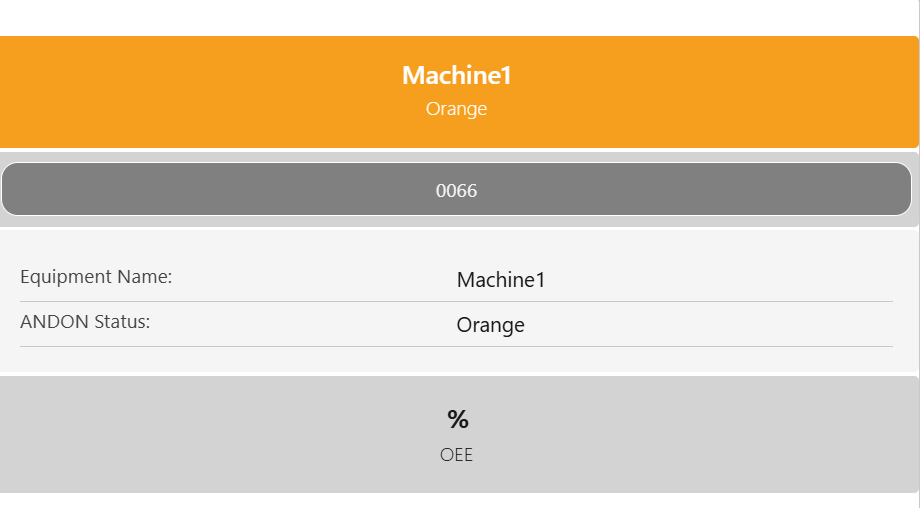
The Andon status components has 4 sections, as shown in the example below:
-
Machine → The machine’s status is shown with a color indicator (currently Red, Orange, and Green) based on the
sfy24__ANDON_Status__c(picklist) field from the Equipment object. The equipment name and current status are always displayed here. If the status duration is enabled, is also displays the elapsed time since the machine’s last status change (resets on page load). -
Machine Operations → Shows related machine operations as a pill, data is shown based on the defined filter (operation 0066 in the example above).
-
Fieldset Data → Displays equipment information from the specified ANDON
sfy24__ANDONField Set on the Equipment object (Equipment Name and Andon Status in the example above). -
OEE → Shows the OEE as a percentage.
Configuring the Andon Status Component
This component is built to work as a component on the Team Cockpit or inside Screen Flows.
Layout sections in flows can be used to adjust width and display.
For each equipment, you can also configure properties to control what data is shown, if it is live and how its styled & how the layout looks like.
List of properties
-
Machine: Selects an equipment record of the record type machine.
-
Machine Id: External Id of the equipment.
-
Field Set API Name: API name of a Field Set on the Equipment object to show control visible fields.
-
Machine Flow API Name: API name of a screen flow triggered when the machine the clicked. Can be left blank if no trigger is needed.
-
Machine Operation Lookup Field: API name of the lookup field on machines to fetch the related operations.
-
Machine Operation Label Field: Field from operation whose value is displayed inside each operation pill.
-
Machine Operation Label Max Length: Maximum characters shown in the pill label. When set to 0, it shows all the content.
-
Machine Operation Pill Size: Size of the operation pill (small, medium, large).
-
Machine Operation Pill Color Field: API name of the field on the operation record storing the color for pills. Uses the 24Flow Color labels.
-
Machine Operation Pill Layout: Defines how the pills are arranged (stacked, inline, wrapped).
-
Machine Operation Filter: JSON filter for controlling which operations are displayed.
-
Machine Operation Visible: Check this box in case you want to show the operations related to machine.
-
Machine Operation Quantity: The maximum number of operations that are displayed.
-
Show Status Duration: When enabled, it displays the elapsed time since the equipment status last changed. The timer is for display only and removed when the page/session is refreshed.
-
Platform Event Name: Specify the API name of the platform event channel this component subscribes to (e.g. /event/sfy24__UpsertNotification__e). This property supports using an expression to define its custom label. The correct format is {!$Label.customLabelName}.
-
OEE: When checked, the OEE value (
sfy24__OEE__cfield on the objectOEE) is shown.