24Flow Spring '26 Release
We are happy and proud to announce the 24Flow Spring '26 Release!
The Spring '26 release focuses on three pillars: Shopfloor Efficiency, Advanced Planning Logic, and Performance Optimization.
Here are some highlights and new product capabilities:
New Team Cockpit Components: Incident Tracking; Output Tracking for Output, Scrap & Rework Registrations; Component picker & a new POLCA board component. All these components provide a consistent look & feel and facilitate a faster implementation.
Parallel Routing: A more structured approach to parallel routing, not only as separate subassemblies, but as part of the main production order.
QRM Number: Track the improvement in Manufacturing Critical Path Time (MCT) over time via the QRM number.
24Planning extension: Various improvements including search capabilities & viewing multiple projects in Gantt as well as a new Flow integration type.
Operation Grouping - Operation Runs: Operation runs is a planning concept that decomposes operations into slots (e.g. hourly slots), such that it is more clearly visible when an operation is being worked on and allows the capacity to vary over the slots.
Checklist: Ability to create checklist results upfront to enable faster page loading.
24Files: new Apex actions to programmatically see what’s inside a SharePoint folder without needing to navigate to it.
Continue reading to learn more on each of these innovations.
New Team Cockpit Components
The configuration of the components described below, is available here.
Incident Tracking
Operators can log issues directly on a production order and route them to the appropriate team. Team leaders can monitor resolution via a new Kanban view.
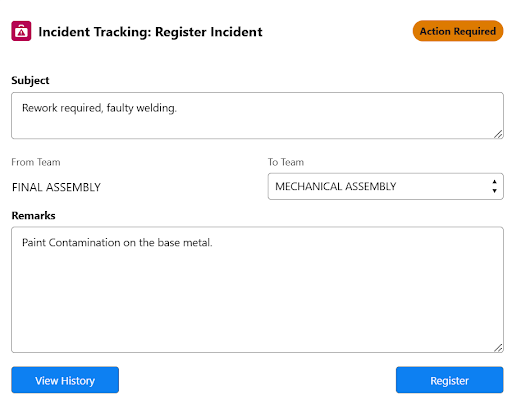
Team cockpit Incident component.
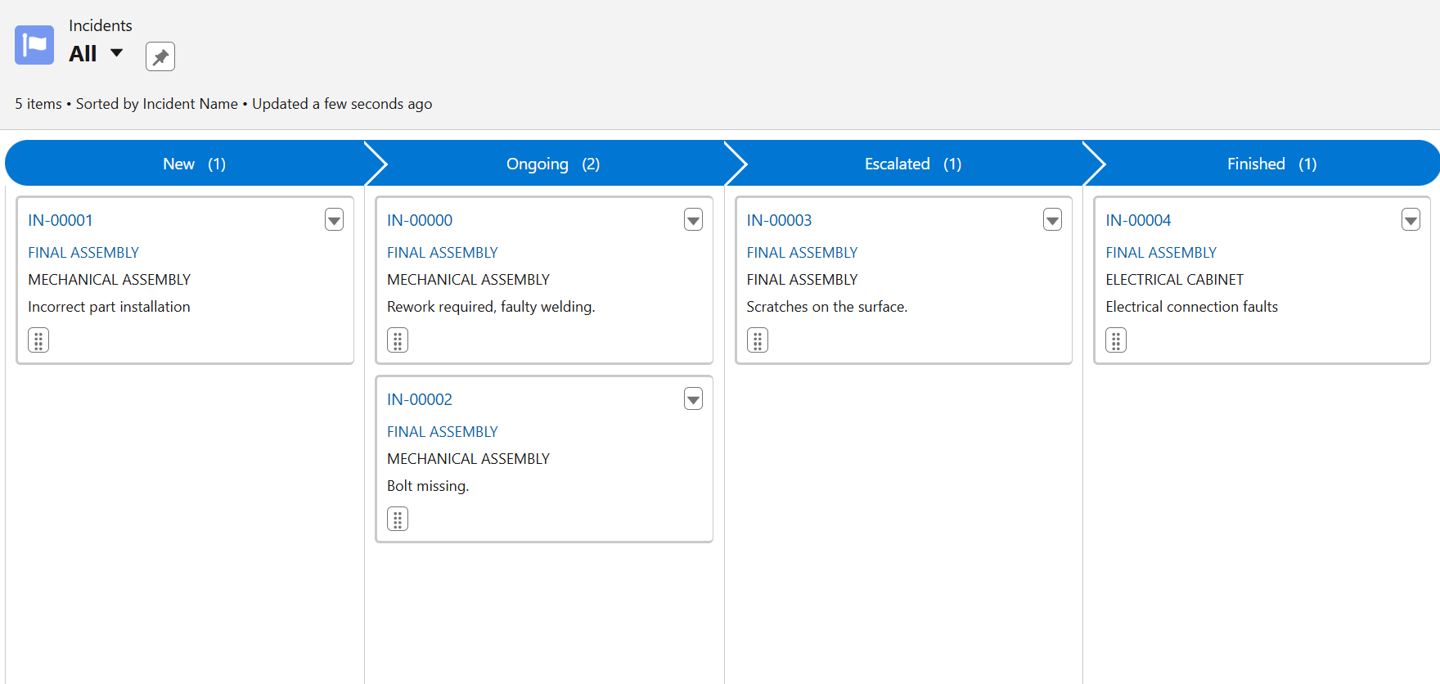
Incident overview for teamleaders.
Output Tracking for Output, Scrap & Rework Registrations
The Output Tracking component allows you to register Output, Scrap or Rework in a Team Cockpit while working on a production order. The component allows you to do multiple and intermediate output registrations for the same production order.
.png?inst-v=f1080ac6-b762-491b-975d-df9c2a69acbf)
Output track component.
Component Picker
The component allows you to do multiple and intermediate component consumption registrations while working on a specific operation for a production order.
.png?inst-v=f1080ac6-b762-491b-975d-df9c2a69acbf)
Component consumption tracking.
POLCA Board
POLCA (=Paired-cell Overlapping Loops of Cards with Authorization) is a flow-control mechanism originating from the QRM (Quick Response Manufacturing) methodology. It is similar to Kanban or CONWIP but better suited to a high-mix low-volume environment where production orders have different routings.
The POLCA board is a new Team Cockpit component that shows the available capacity for each paired team (= paired loop) where the FROM team is the Team of this Team Cockpit and the TO team is the team of the next routing step.
Once the capacity on a loop is depleted, it is no longer possible to claim capacity from the next team and to start working on an order destined to that team. This mechanism avoids an overload of work at downstream teams when no capacity is available at those teams. When these downstream teams complete orders, capacity is released again to upstream teams.
POLCA makes use of cards:
Each loop between teams is allocated an number of cards.
Each order consumes a number of cards on that loop
.png?inst-v=f1080ac6-b762-491b-975d-df9c2a69acbf)
Polca Cards example.

24Flow also supports an alternative Polca mechanism based on time, where capacity per loop is expressed in minutes, hours or days.
Parallel Routing
In the majority of cases, a production flow is sequential, i.e. routing step X+1 can be executed only after routing step X has been finished. In a parallel routing scenario, routing step X and X+1 can proceed in parallel, but routing step X+2 can only start when both routing step X and X+1 have been finalized. For parallel routing to work, 24Flow allows to model multiple dependencies both as part of scheduling logic and in Team Cockpits. More info can be found here.
QRM Number
The QRM number is a metric that allows you to track improvements in Manufacturing Critical Path Time (MCT) over time, i.e. improvements in manufacturing lead time.
It is defined as:
QRM Number = 100 x ( Base Period MCT / Current Period MCT)
So, the initial QRM Number score is 100, and as the MCT get shorter, the QRM number increases.
24Flow now allows you to store MCT Calculation records and track MCT improvements via the QRM number. Read more on QRM Number configuration in this section.
24Planning
Ability to restrict actions on certain events to avoid accidental mistakes.
Work with resource availabilities in the Gantt Chart and automatically extend task durations as a function of resource availability.
Add columns in the left pane in the Gantt Chart and search.
A new Flow integration type called Transform, that let’s you transform events in the front end, before deciding to save them to the back-end. Learn more here.
Use Flow integrations in the Gantt Chart to add custom actions.
Load multiple projects in one Gantt Chart view.
Operation Grouping - Operation Runs
24Flow supports both automated scheduling at the production order level and at the operation level. Operation Grouping is a 24Flow concept that applies rule-based scheduling to bottleneck operations.
Within this Operation Grouping, the Spring '26 Release introduces a new concept called Operation Runs. Operation runs decompose operations into slots, such that it is more clearly visible when an operation is being worked on and allows the capacity to vary over the slots.
The screenshot below illustrates the concept.
.png?inst-v=f1080ac6-b762-491b-975d-df9c2a69acbf)
You can clearly see that there is a break between 16:30 and 17:00, as well as between 20:00 and 20:15. The visualization also shows differences in actual productivity when the effective working time is less than a full hour. In addition, it clearly indicates the periods during which production is closed.
By using operation runs, you can clearly display variations in hourly productivity as well as non-working time within a longer, overarching operation.
More information on the detailed configuration options for Operation Runs can be found here.
24Checklist
It is now possible to create checklist results upon a trigger, which has several interesting use cases:
The triggered checklists are a more flexible alternative to filter rules to determine when checklists are shown on a record page.
When you have a lot of checklists, it may be better to generate the checklist results at the time the records are created rather than when the record pages get first loaded. It will save considerable time in page loading.
24Files
New Apex actions have been added:
List all Files in a Record: Retrieve amongst others the file count and file list for specific folders in SharePoint.
Create Chatter File Links: Programmatically create links to files stored in SharePoint, accessible in 24Flow.