
List All Files for a Record
The “List Files in Record or its Folder” invocable Apex method lets you retrieve a list of SharePoint files for a Salesforce record.
Normally, users browse files through the 24Files LWC component. But sometimes files are created or managed entirely by automation, and users never open the folders themselves. This method gives your Flows or other Apex processes a way to see what’s in a folder without needing anyone to click around.
It works for both recursive searches across all subfolders or targeted searches in a single folder, so you can use it to check how many files exist, find specific file types, or generate simple file reports.
Using the Apex action
Invoke the method via Apex Action in a Flow. Input parameters:
Record Id (Required): the record ID to get files for.
Folder Path (Optional):
Leave empty to get all files from the root folder and all subfolders.
Provide a path to only get files in that folder (non-recursive). Use
/for the root folder.Path is relative to the Record Folder (authenticated) or Public Folder (anonymous).
Use Anonymous Access (Optional): When true, only searches the Public folder. Default:
false.
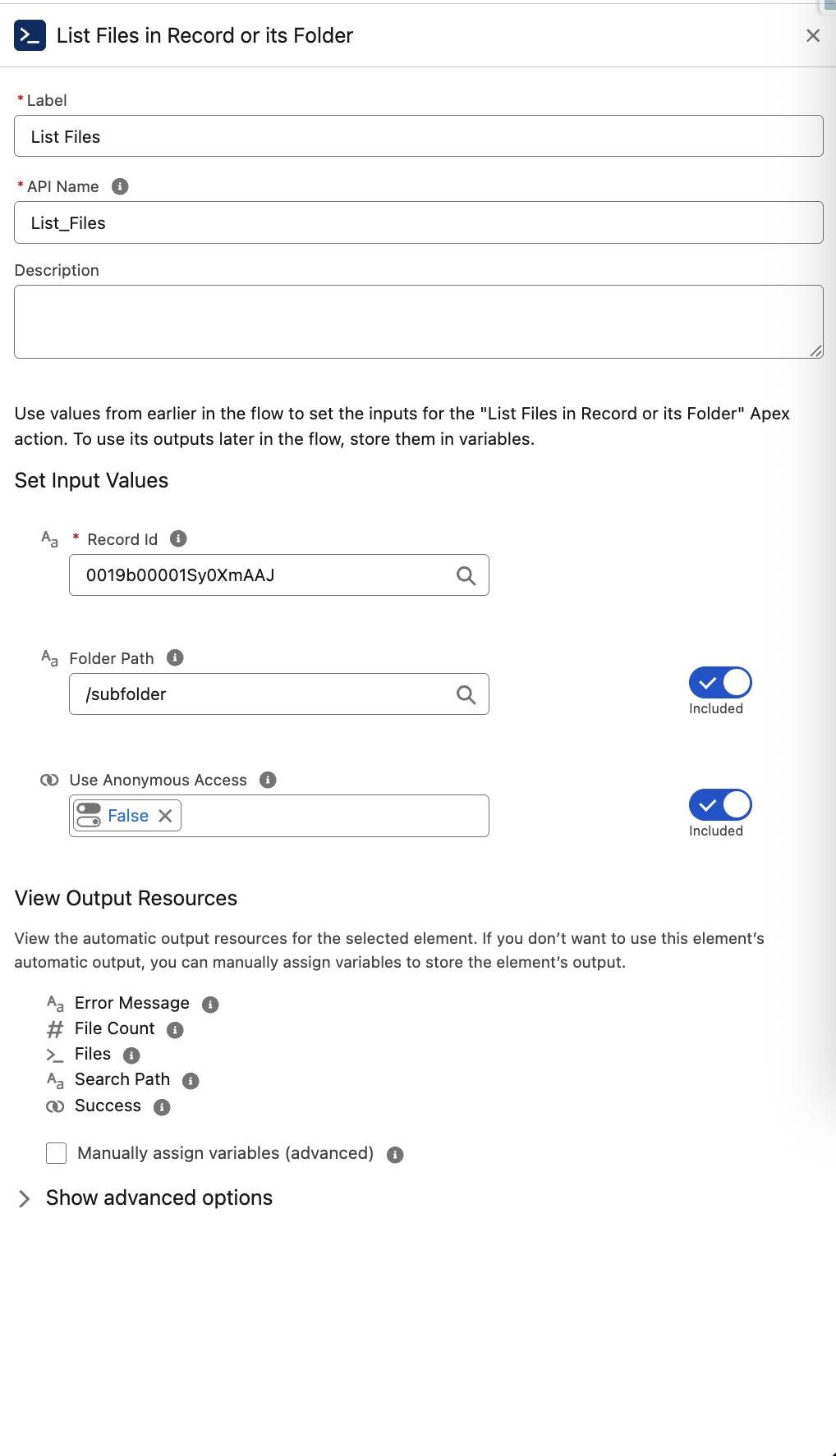
Response output
File count: number of files that were found.
Files List: list of files with details including name, type, size, last modified date, and last modifier.
Search path: the actual folder that was searched/visited.
Success: indicates whether the method ran successfully.
Error message: populated with error when something goes wrong.