
24Flow Data structure
Overview
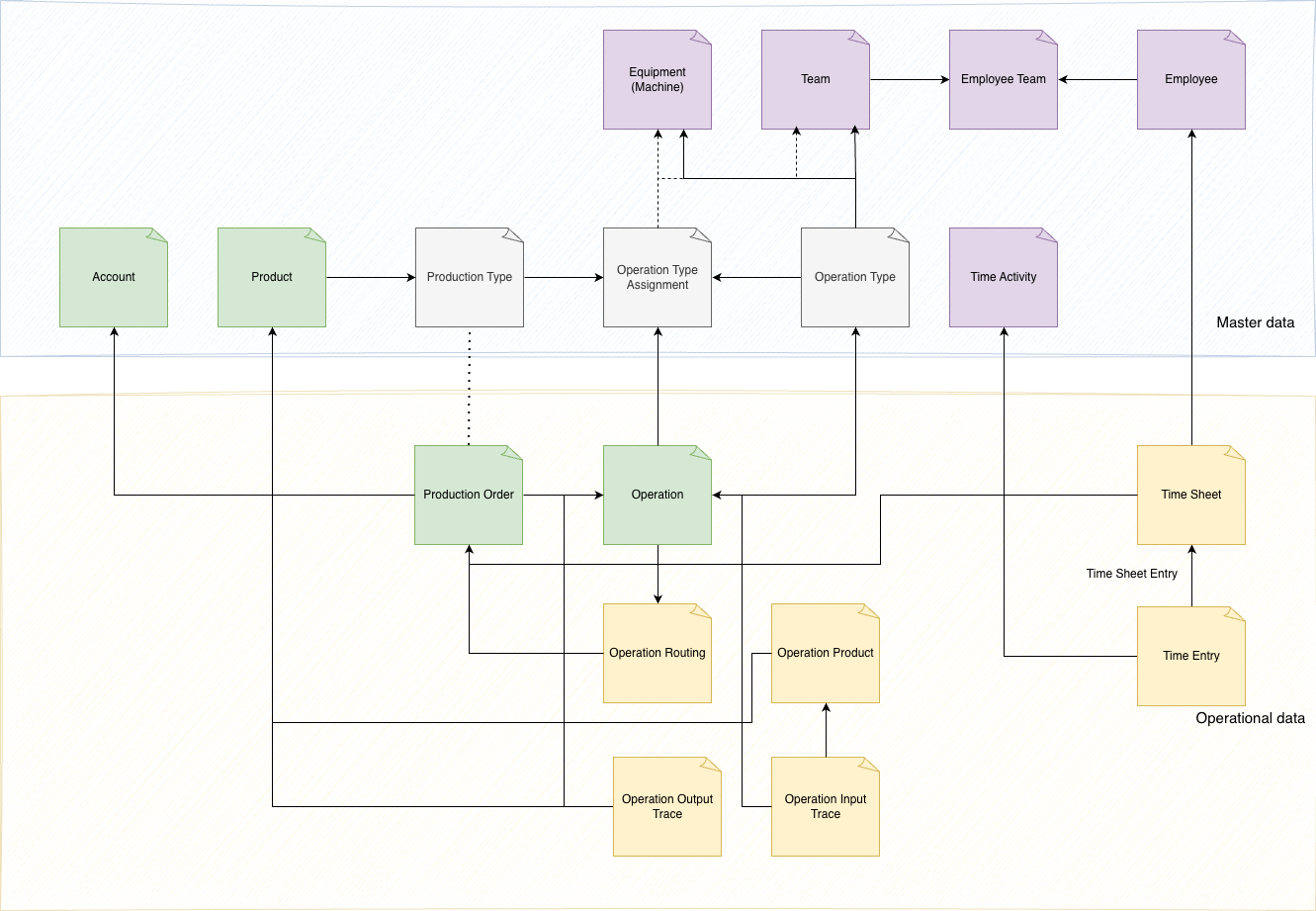
Green: Represents master data typically sourced from the ERP system. This includes foundational data such as products.
Purple: Indicates master data maintained directly within 24Flow. This data is specific to the workflow and optimizations managed within the 24Flow platform, such as specific production configurations or custom routings tailored to the manufacturing process.
Grey: depends on project setup decisions, determining whether Production Type and Operation Type and assigments reside in the ERP system, 24Flow, or a combination of both. This flexibility allows for configuration based on the specific needs of the manufacturer and the system integration approach.
Master data
Refers to the essential, static information that forms the backbone of efficient production management for high-mix, low-volume manufacturing. In 24Flow, master data includes critical details such as products (materials and components), production types (operation sequences), and teams (work centers).
This data ensures seamless integration across processes like scheduling, execution, and tracking within 24Flow’s environment. By maintaining accurate and consistent master data, 24Flow enables manufacturers to optimize workflows, improve decision-making, and ensure compliance with quality and production standards, empowering them to operate more effectively and efficiently.
For a complete list of object fields we refer to the 24Flow API documentation: https://api-docs.24flow.eu/#/
Account
Account fields
Field label | Description |
|---|---|
Account Name | The name of the account. If the account is a person account, the account name is the concatenation of the first name, middle name, last name, and suffix of the associated person contact. |
Account Number | The account number assigned to this account (not the unique, system-generated ID assigned during creation). |
Shipping Address | The shipping address for the account. |
Salesforce entity: account fields
Product
Product fields
Field label | Description |
|---|---|
Product Name | The name of the product. |
External ID | The unique identifier of a record in the linked external data source. |
Product Code | The product code for the product. |
Product Description | The description of the product. |
Quantity Unit of Measure | The unit of measure for the product. For example, kilograms, pounds, or cases. |
Production type | production type description |
Salesforce entity: product fields
Team
Team fields
Field label | Description |
|---|---|
Team Name | The name of the team. |
External ID | The unique identifier of a record in the linked external data source. |
Employee
Employee fields
Field label | Description |
|---|---|
Employee Name | The name of the employee. |
External ID | The unique identifier of a record in the linked external data source. |
Employee Team
The Employee Team link enables an employee to be associated with one or more teams, allowing flexibility in assigning employees to multiple teams based on their roles, skills, or responsibilities.
Employee Team fields
Field label | Description |
|---|---|
Employee | Reference to an employee. |
Team | Reference to a team. |
Equipment
Operation type
Operation types define how a task is performed, the resources involved (e.g., machines, teams), and the outputs expected.
Common Operation Types:
Machining Operations: Processes that remove material to shape a part, such as drilling, milling, or turning.
Assembly Operations: Tasks where components are joined together, such as welding, screwing, or fastening.
Fabrication Operations: Methods that transform raw materials, like cutting, bending, or forming.
Inspection Operations: Steps to verify quality, measurements, or conformance to standards.
Finishing Operations: Processes that enhance the surface or appearance of a product, such as painting, coating, or polishing.
Packaging Operations: Preparing products for shipment or distribution.
Operation type fields
Field label | Description | Example |
|---|---|---|
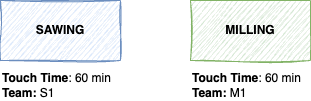
Name | The name of the operation type. | Sawing |
External Id | The unique identifier of a record in the linked external data source. | OPT00112232 |
Touch Time | Touch Time is the actual time spent actively working on a product or task, directly adding value to it during the process. It also includes the setup time. | 60 |
Non-Touch Time | The time during a process when no active work is being done on a product, and no value is being added to it | 10 |
Touch Time Duration Type | Time unit | Hours |
Non-Touch Time Duration Type | Time unit | Hours |
Operation Type Example
Production type
Acts as a production blueprint for one or more products. A production type represent the workflow, collection, of operation types.
Field label | Description | Example |
|---|---|---|
Name | The name of the production type. | MTO Vessel |
External Id | The unique identifier of a record in the linked external data source. | PT0022323 |
WIP Control System | None , Kanban , Conwip, Polca, Polca Time | None |
Production Type Example
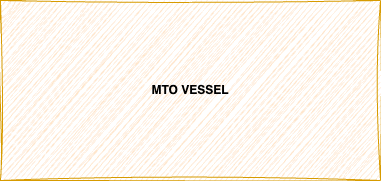
The MTO vessel production type describes the production process of a simpel vessel, this wil be extended in the next section.
Operation type assignment
This relationship ensures that operation type follow the correct sequence for the associated production types while allowing for specific overrides to adapt to unique product requirements.
Operation type assignment fields
Operation type assignment contains the same fields as operation type.
Field label | Description | Example |
|---|---|---|
External Id | The unique identifier of a record in the linked external data source. | Q00112232 |
Sequence | Defines the order within the production type | 10 |
Predecessor | Unique salesforce reference to the previous operation type. | a2YUB0000005aZQ2AY |
Touch Time | Touch Time is the actual time spent actively working on a product or task, directly adding value to it during the process. | 40 |
Non-Touch Time | The time during a process when no active work is being done on a product, and no value is being added to it | 5 |
Operation Type Assignment Example
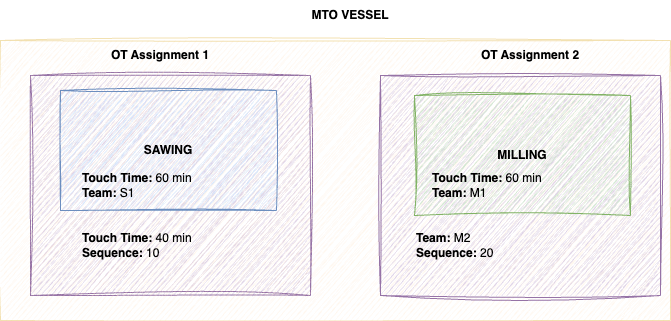
In the example above, multiple operation types are linked to a production type via an Operation Type Assignment. This assignment allows you to override the default settings of an operation type for specific production scenarios.
For instance, when a MTO Vessel production type is used in a production order, the touch time for the sawing operation is adjusted to 40 minutes, overriding the default setting of 60 minutes. The default team of the milling operation is adjusted to M2.
Operational data
Production Order
A Production Order is the operational execution of a specific Production Type, representing a real-time instance where the defined processes, resources, and materials are applied to manufacture a product.
Production Order Fields
Field label | Description | Example |
|---|---|---|
Name | Name of the production order. | PO20241102 - Product A |
External Id | The unique identifier of a record in the linked external data source. | PO20241102 |
Account | Reference to Account, the customer who ordered the production order. | Metalworks NV. |
Product | Reference to the product which needs to be produced. In make-to-order industry it is not required to specify specific products for each possible combination. | Vessel |
Production Type | Reference to the production type, blueprint, containing the production workflow. | MTO VESSEL |
Quantity | Number of pieces to produce on the given production order. | 10 |
Delivery Date | Promised delivery date to a customer, often acts baseline date for planning. | 01/02/2025 |
Fields listed above are the key fields which are often used, see API documentation for the complete list.
Operation
Is an instance of an operation type assignment configuration. It is possible to directly retrieve operations for a specific production order from an ERP system without the need of the operation type assignment blueprint.
Operation Fields
Field label | Description | Example |
|---|---|---|
Name | Name of the operation. | O122393383 |
External Id | The unique identifier of a record in the linked external data source. | O122393383 |
Sequence | Defines the order within the production order | 10 |
Subject | Subject of the operation | Saw |
Team | Reference to the team | Sawing Team 1 |
Equipment | Reference to the equipment | Machine 1 |
Touch Time | Touch Time is the actual time spent actively working on a product or task, directly adding value to it during the process. | 40 |
Non-Touch Time | The time during a process when no active work is being done on a product, and no value is being added to it When specified on operation type (assignment) level this value is used. | 5 |
Operation Product
A component within a production order that defines the specific product or material being processed during an operation. It links the operation to the item being manufactured or transformed, ensuring accurate tracking and alignment with production requirements.
Operation Product Fields
Field label | Description | Example |
|---|---|---|
External Id | The unique identifier of a record in the linked external data source. | OP1012202 |
Product | Reference to the product. | Metal sheet |
Quantity | The required product quantity. | 1 |
Status | Used to specify if a component is available or not. | In stock |
Sequence | Defines the order within the operation | 10 |
Operation | Reference to the operation to on which the operation product is required. When left empty the operation product is directly linked to the production order. | O122393383 |
Production Order | Reference to the production order. | PO20241102 |
Operation Routing
A production order consists of multiple operations. Each operation has a sequence number and is assigned to a specific team. To optimize the workflow, operations that are assigned to the same team and are sequentially connected can be grouped together into an "operation routing."
For example:
Operation 1: Sequence 10, assigned to Team 1
Operation 2: Sequence 20, assigned to Team 1
Operation 3: Sequence 30, assigned to Team 2
In this case:
Routing 1: Groups Operations 1 and 2 under Team 1 because they share the same team and are sequential.
Routing 2: Starts with Team 2, containing Operation 3, and has no subsequent team assignment.
This approach ensures operations are logically organized based on team responsibility and sequence, streamlining production processes.
Operation Routing Fields
Field label | Description | Example |
|---|---|---|
From Team | Reference to the from team | Q00112232 |
To Team | Reference to the to team | |
Sequence | The Sequence of the routing. | 10 |
Time Activity
A Time Activity describes the specific type of work performed during a time entry. It categorizes labor or machine time such as ‘Setup,' 'Production,' or 'Training’.
Time Activity Fields
Field label | Description | Example |
|---|---|---|
Time Activity Code | Unique code of the activity performed | TR |
Time Activity Icon | Icon used in time tracking application |
Time Sheet & Time Entry
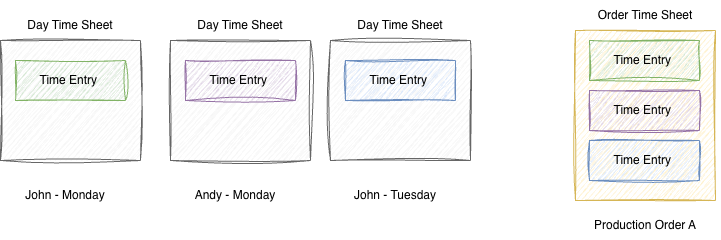
A time sheet is a collection of related time entries. It typically aggregates the entries of a specific employee on a specific day, or compiles all entries for a complete production order to facilitate cost calculation. Time sheets can be linked to status approval processes. A Time Entry is linked to a Time Sheet via a Time Sheet Entry. This intermediate object resolves the many-to-many relationship between the two entities.
For example, workers John and Andy each work 4 hours on Production Order A on Monday. On Tuesday, only John works 2 hours on Order A.
Time Sheet Fields
Field label | Description | Example |
|---|---|---|
Employee | Reference to the employee who consumed the input. | John Doe |
Production Order | Reference to the production order. | PO20241102 |
Status | New , Submitted, Rejected, Approved | New |
Start Date | Start reference of time sheet. | 2025-12-05 |
End Date | End reference of time sheet. | 2025-12-05 |
Total Duration Minutes | Displays the total duration of all time sheet entries in minutes. | 240 |
Total Duration Hours | Displays the total duration of all time sheet entries in hours. | 4 |
Time Entry Fields
Field label | Description | Example |
|---|---|---|
Operation | Reference to the operation to on which time tracking occured | O122393383 |
Production Order | Reference to the production order. | PO20241102 |
Employee | Reference to the employee. | John Doe |
Start | Time tracking start. | 2025-12-05T09:43:16.000+0000 |
Stop | Time tracking stop. | 2025-12-05T10:50:16.000+0000 |
Time Activity | Reference to the time activity code. | AW |
Time Sheet Entry Fields
Field label | Description | Example |
|---|---|---|
Time Sheet | Reference to the time sheet | TS15445456 |
Time Entry | Reference to the time entry | TE202411502 |
Operation Output Trace
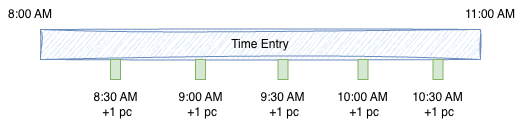
When detailed output registration is required, output traces are used to track individual entries of produced goods at the production order and operation level. When time tracking is enabled, these traces include a reference to the associated employee time entry.
For example, an operator starts time tracking on Production Order A from 8:00 AM to 11:00 AM. During that period, they produce one piece every 30 minutes, resulting in detailed tracking information.
Operation Output Fields
Field label | Description | Example |
|---|---|---|
Time Entry | Reference to possible time entry. | TE20241102 |
Product | Reference to the product which is produced. | Vessel |
Operation | Reference to the operation to on which the product is produced. | O122393383 |
Production Order | Reference to the production order. | PO20241102 |
Employee | Reference to the employee who produced the output. | John Doe |
Start | When output production started. | 2025-12-05T09:43:16.000+0000 |
Stop | When output production stopped. | 2025-12-05T09:50:16.000+0000 |
Type | Output or Scrap | Output |
Operation Input Trace
When detailed input registration is required, input traces are used to track individual entries of consumed goods at the production order , operation and operation product level.
As an example, an operator consumes a sensor during the assembly of an electrical module on a specific production order.
Field label | Description | Example |
|---|---|---|
Product | Reference to the product which is consumed | Electrical module |
Operation | Reference to the operation to on which the product is consumed. | O122393383 |
Production Order | Reference to the production order. | PO20241102 |
Employee | Reference to the employee who consumed the input. | John Doe |
Start | When product consumption started. | 2025-12-05T09:43:16.000+0000 |
Stop | When product consumption stopped. | 2025-12-05T09:50:16.000+0000 |
Type | Input or Scrap | Input |