
24Flow Summer '23 Release
Translation Workbench
Benefit:
Dutch translations for all 24Flow managed objects.
Description:
A Dutch translation workbench has been added. All 24Flow managed objects, fields, buttons etc now have Dutch translation. The translation can be adjusted by the user. More information can be found via: https://help.salesforce.com/s/articleView?id=sf.workbench.htm&type=5
Team Cockpit Filtering
Benefit:
The user can now:
Create his own filter logic.
Create more specific Team Cockpit pages via this filter logic.
Description:
In the Team Cockpit Settings page, apply filter logic in order to show only your relevant orders. Create your own filter logic by adding conditions and/or group them.
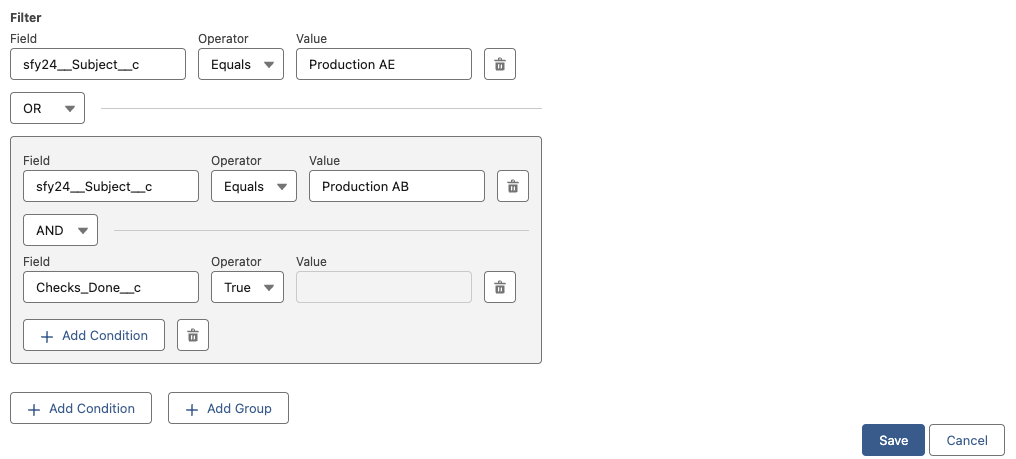
Create your own filter logic
Competence Management: Training Skill
Benefit:
The user can now:
Assign skills and skill levels to a training.
Automatically update the competence matrix for an employee when a training has succeeded.
Description:
By going to a Training record and clicking on related you can add existing or add new training skills to the training.

Add skills and skill levels to a training
The skills of an employee are updated w.r.t. the training that is filled in on the employee training. They are updated when:
The employee training has been updated to status = Succeeded
The employee doesn’t has the skills or has the skills with a lower or equal skill level. In case of equal skill level, the date on which the employee obtained the skill will be updated.
New Material Availability UX
Benefit:
A better user interface to display material availability in the Order Pool. The user can now immediately see which materials are not yet fully in stock before releasing a production order.
Description:
The visualization takes the operation product records of the production order into account. When one or more operation product records don’t have enough stock for the required quantity it is displayed with an information icon in the order pool. By hovering over the information icon, you get all materials that don’t have sufficient stock. When all materials are in stock, it’s displayed in green.
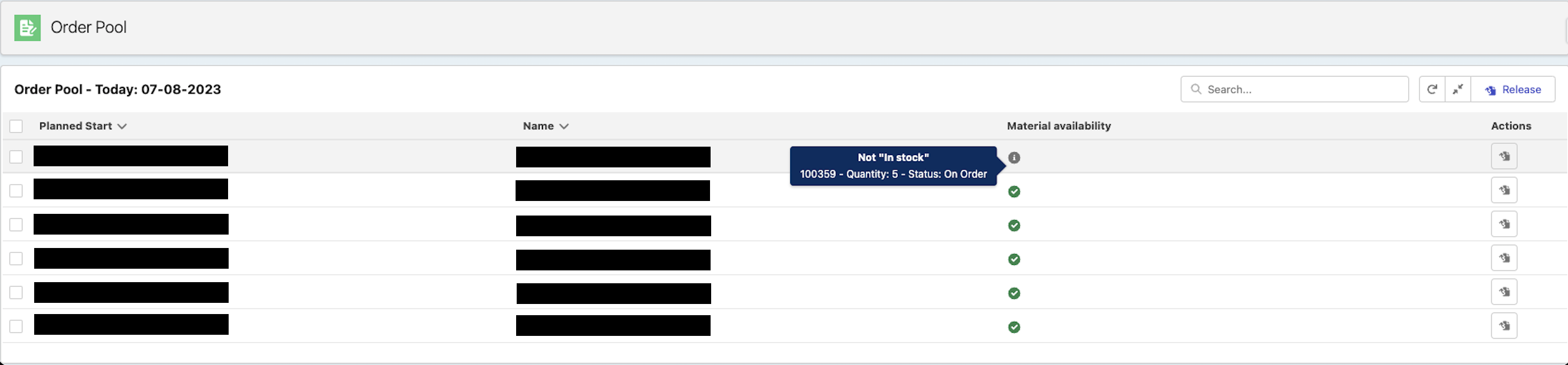
Display whether a production order has all required raw materials. If this is not the case, display the shortages by hovering over the material availability information icon
Sub Releases
24Flow:
v1.22.0
v1.23.0
v1.24.0
v1.25.0
v1.26.0
v1.28.0
v1.29.0
v1.30.0
v1.30.1
v1.31.0
Utils:
v1.7.0
v1.8.0
v1.10.0
v1.11.0
v1.12.0
v1.13.0
v1.14.0
v1.15.0
Translations:
24Flow - Translations v0.1.0